Open The "Conversation Settings" Window In Nextcloud Talk

Open The “Conversation Settings” Window In Nextcloud Talk

1) Log in to Nextcloud.

2) Navigate to Nextcloud Talk as described here.

3) Navigate to the “Conversation settings” window.

There are six options for navigating to the “Conversation settings” window

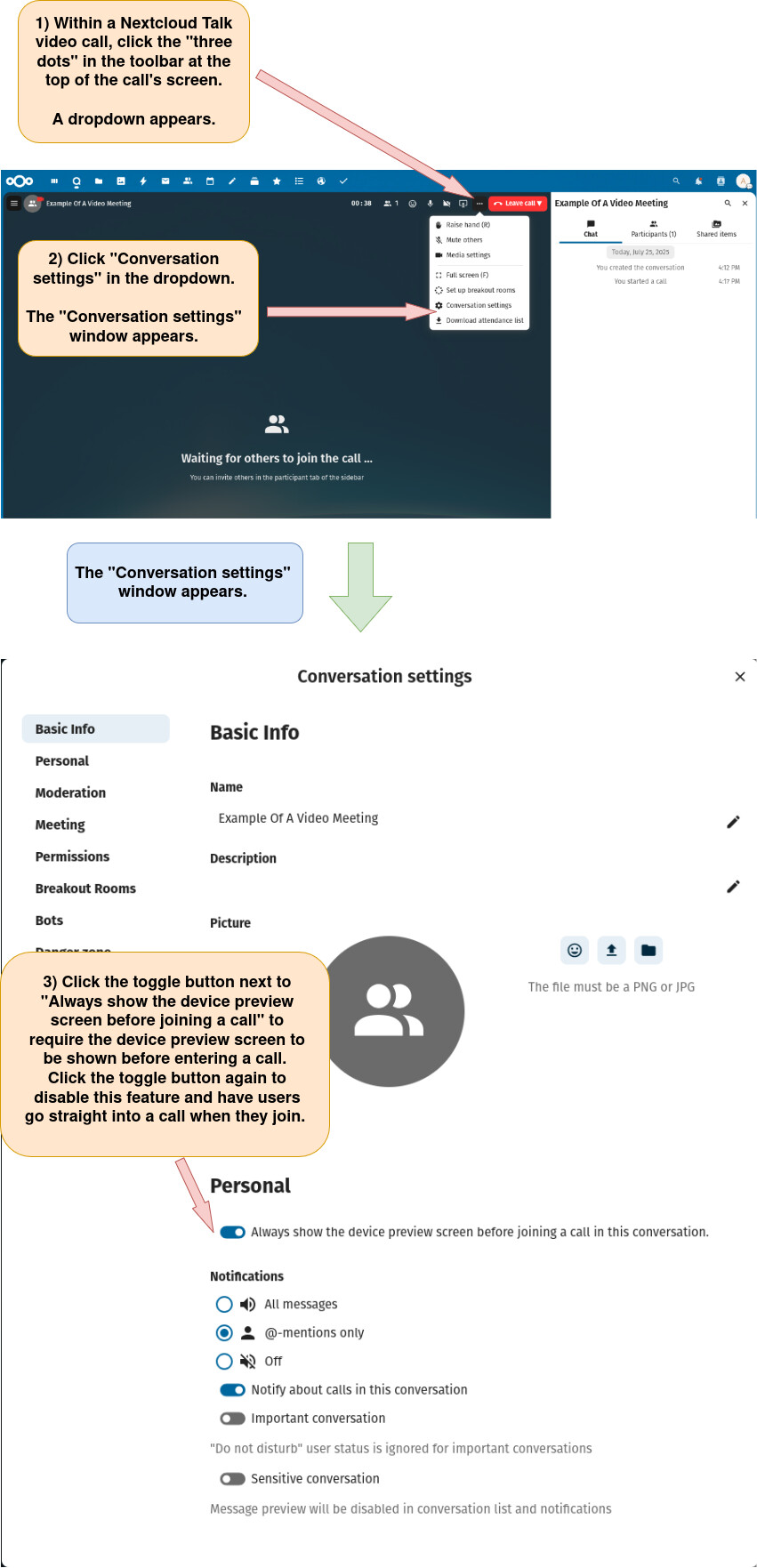
Option 1: Open the “Conversation settings” menu from within a new Nextcloud Talk video meeting.

a) Start a new Nextcloud Talk video meeting as described here

b) Open the “Conversation settings” window as described below.

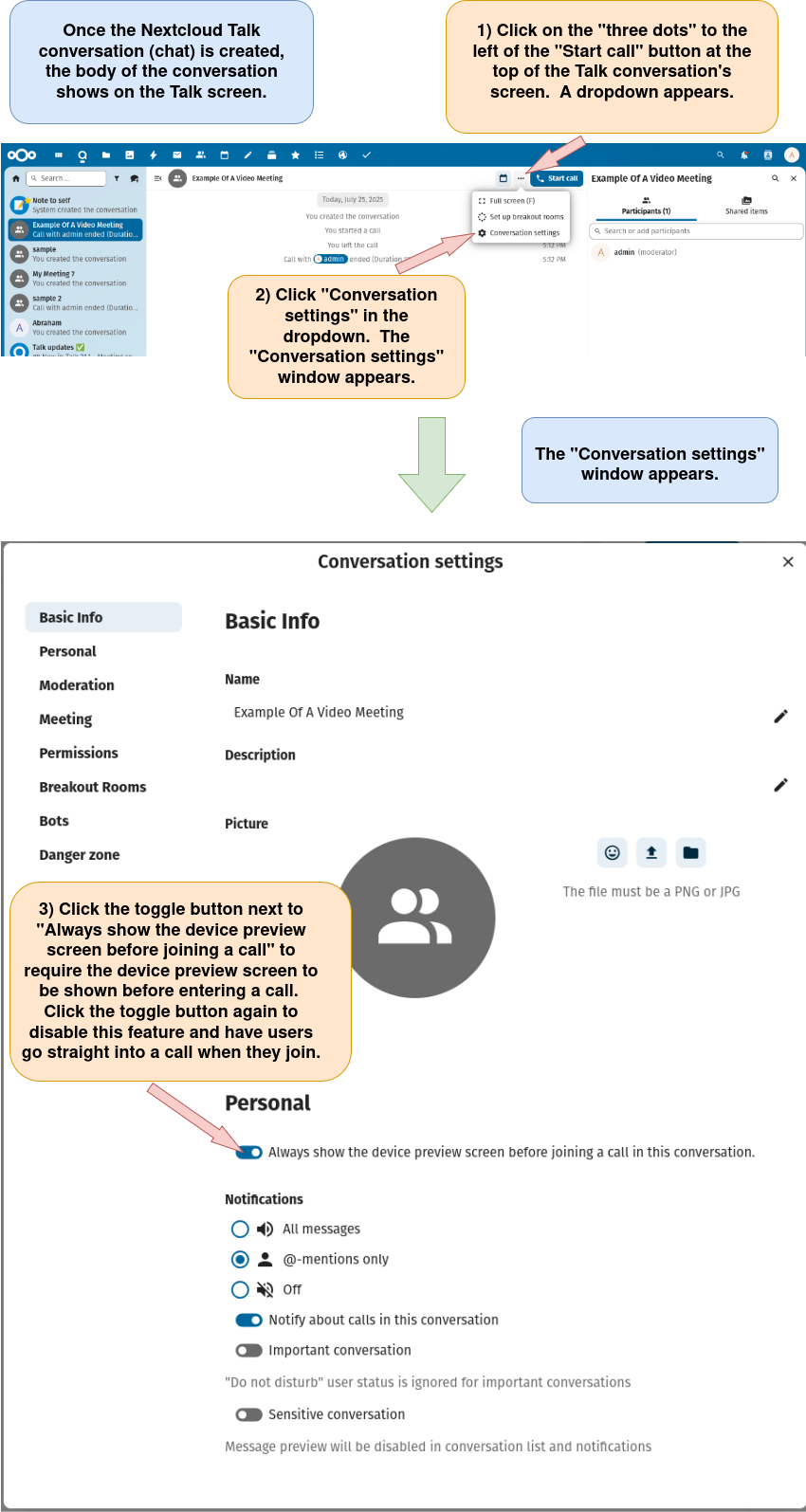
Option 2: Open the “Conversation settings” window from within a new Nextcloud Talk conversation.

a) Start a new Nextcloud conversation (chat) as detailed here.

b) Open the “Conversation settings” window as described below.

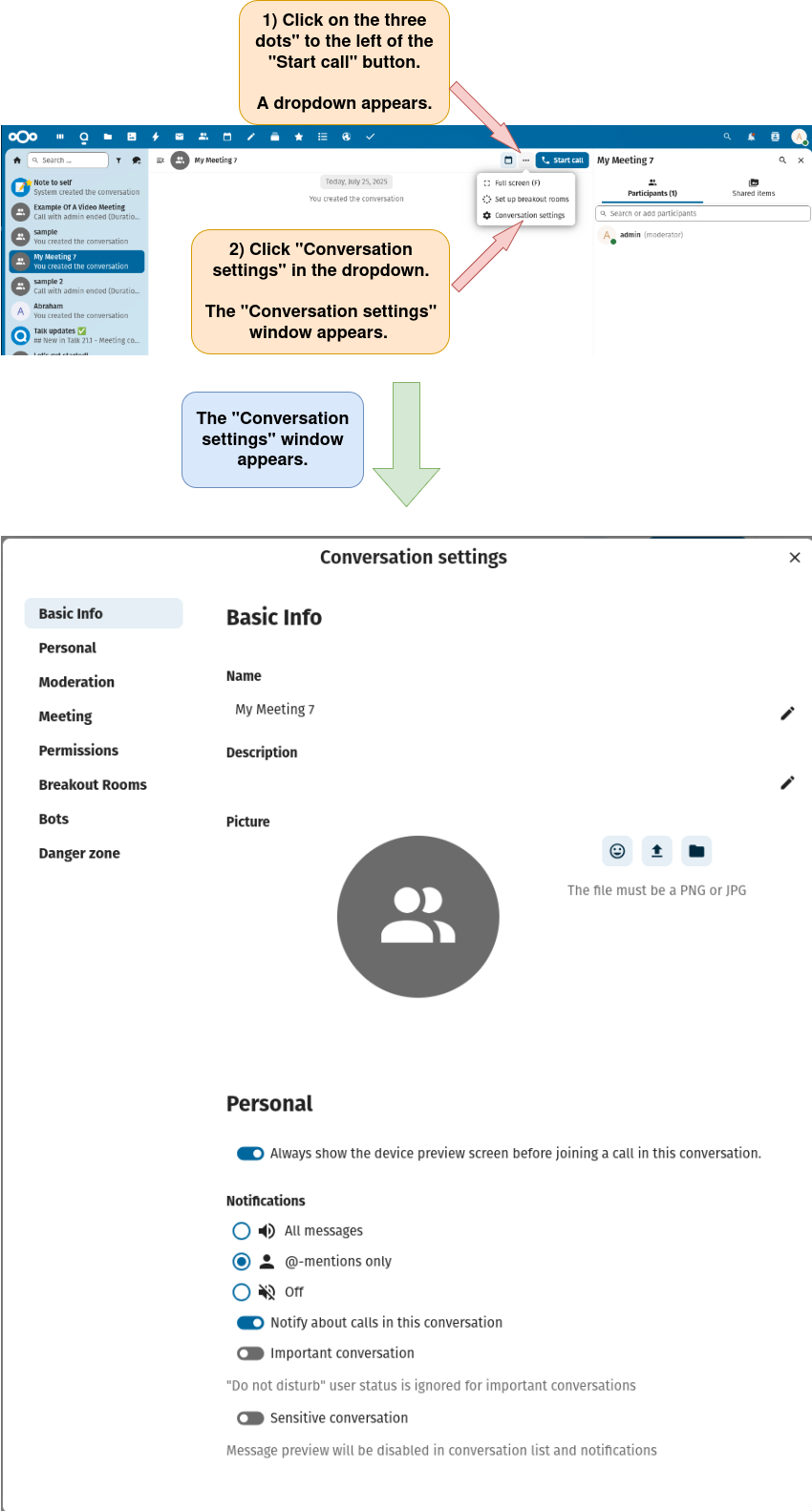
Option 3: Open the “Conversation settings” window from within an existing Nextcloud Talk conversation

a) Find, select, and open an existing Nextcloud Talk conversation as described here.

b) Open the “Conversation settings” window.

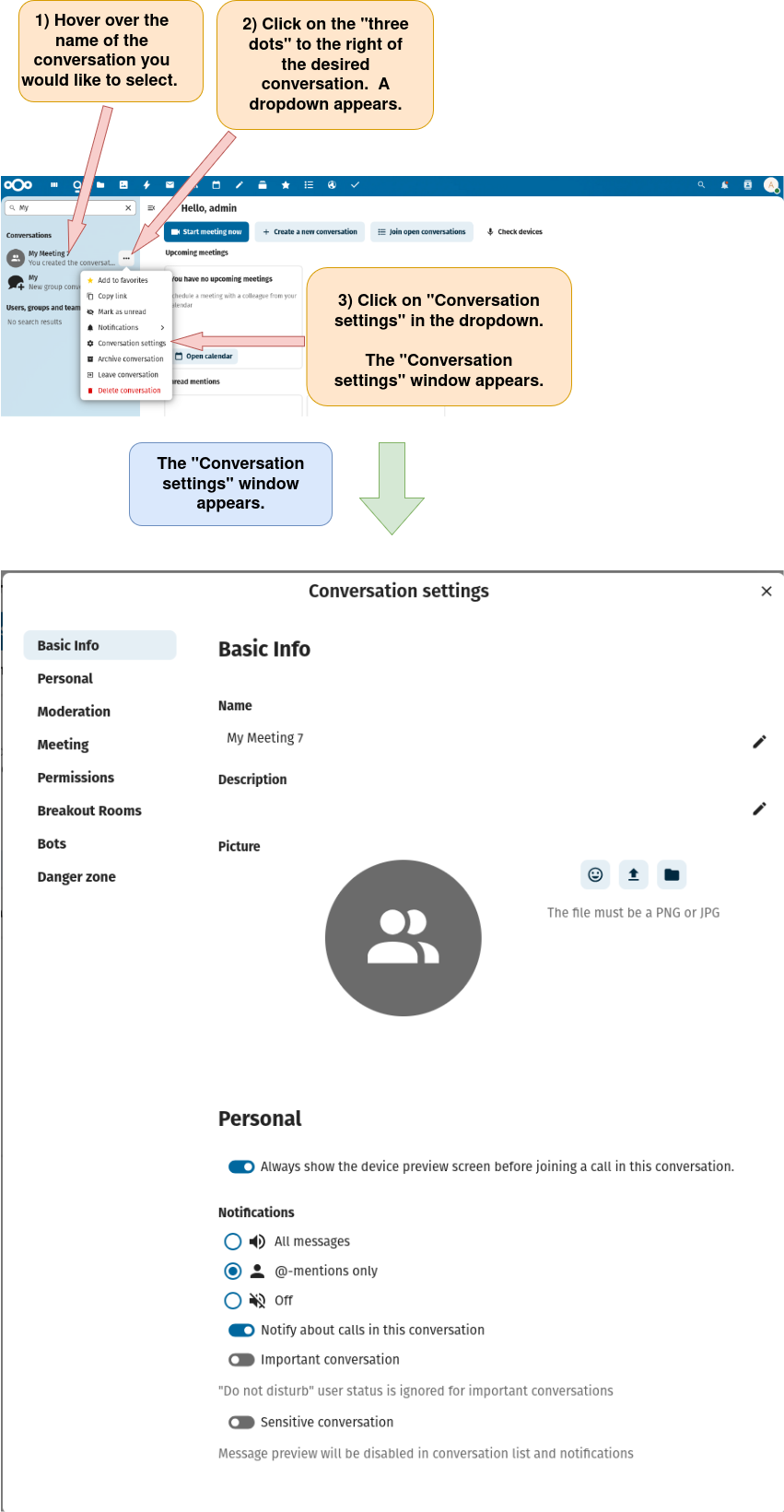
Option 4: Open the “Conversation settings” window by clicking the three dots to the right of an existing Nextcloud Talk conversation in the left sidebar.

a) Find an existing Nextcloud Talk conversation as described here.

b) Open the “Conversation settings” window as described below.

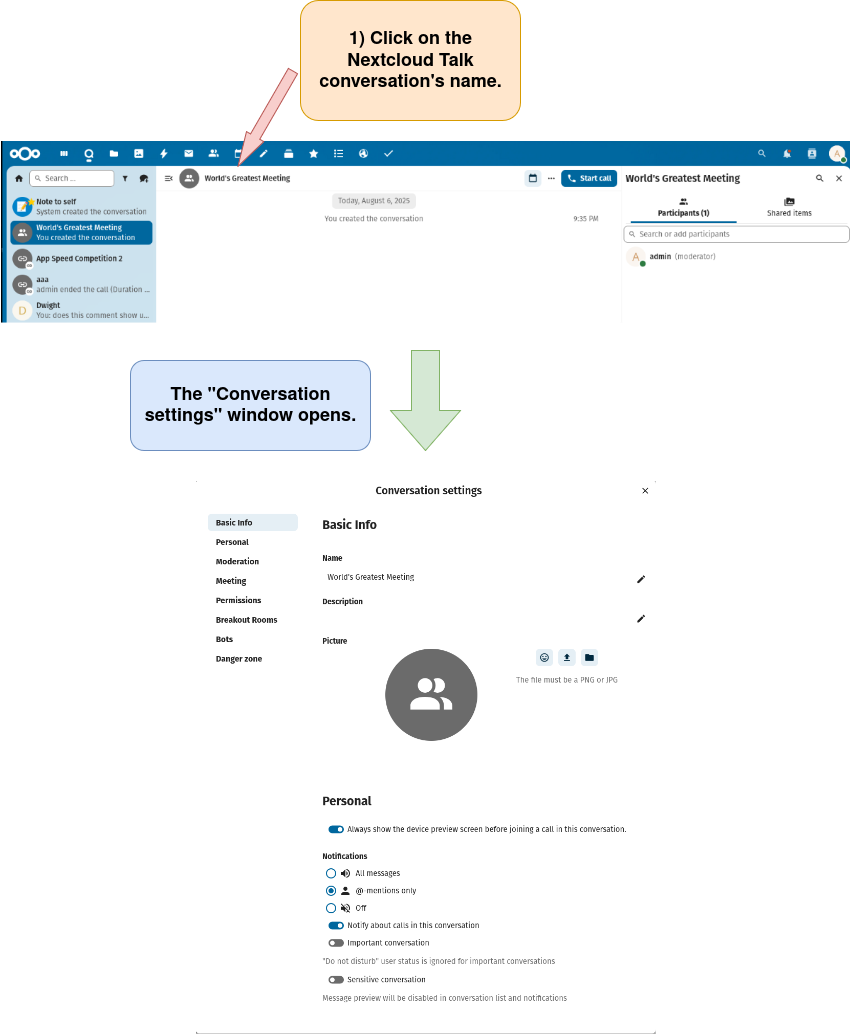
Option 5: Open the “Conversation settings” window by clicking the conversation name in a Nextcloud Talk char conversation.

a) Open an existing Nextcloud Talk chat conversation as described here or open a new Nextcloud Talk chat conversation as described here.

b) Click on the Nextcloud Talk conversation’s name to open the “Conversation settings” window.

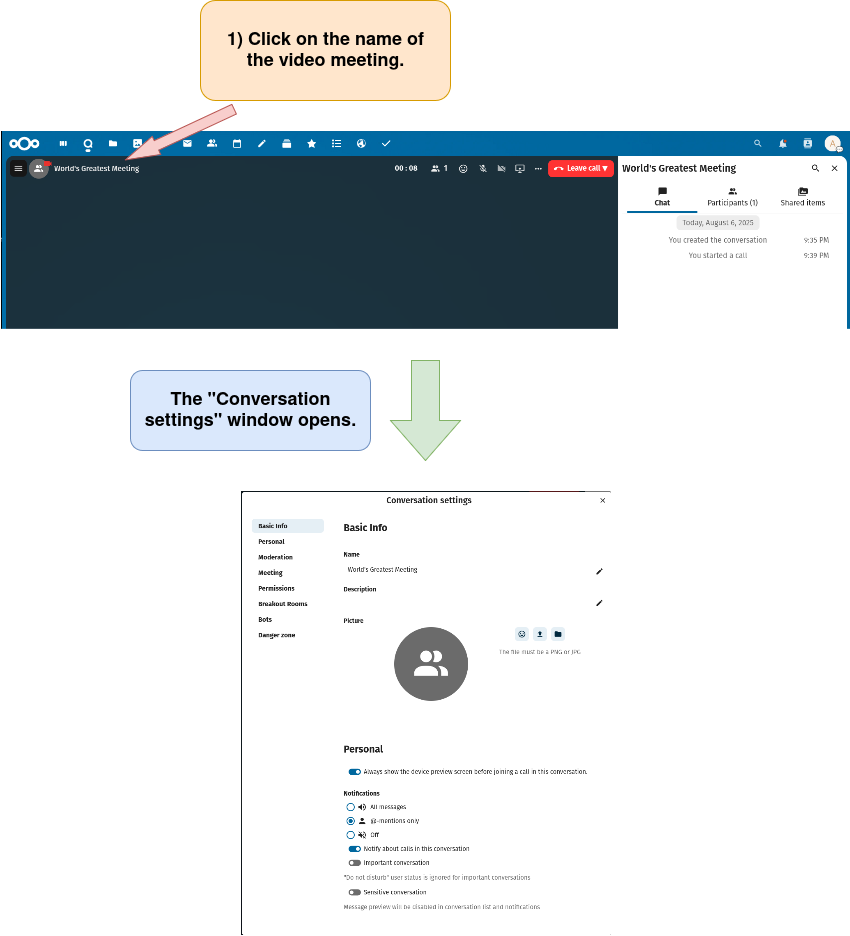
Option 6: Open the “Conversation settings” window by clicking the conversation’s name in a Nextcloud Talk video meeting.

a) Create a new video meeting as described here or open a video meeting from an existing conversation as described here.

b) Click on the Nextcloud Talk video meeting’s name to open the “Conversation settings” window.

Delete A Nextcloud Talk Conversation
Turn On Notifications Which Indicate When A Call Starts Within A Nextcloud Talk Conversation
Turn On Notifications For All Messages, Enable Notifications Whenever There Is A Message
Require Preview Screen Before Entry To Nextcloud Talk Video Meeting
Delete A Nextcloud Talk Conversation
Configuring A Nextcloud Talk Video Meeting Using The "Media Settings" Window, Comprehensive Guide
Turn On Notifications For All Messages, Enable Notifications Whenever There Is A Message
Turn Off Notifications Which Indicate That A Call Has Started Within A Nextcloud Talk Conversation
Ignore "Do Not Disturb" For A Nextcloud Talk Conversation
Turn On Notifications For "@-mentions" Only In Nextcloud Talk
Ignore "Do Not Disturb" For A Nextcloud Talk Conversation
Set Direct To Video Meeting Upon Opening Nextcloud Video Meeting, Set A Nextcloud Talk Conversation So That Participants Go Straight Into The Conversation, Disable Show Device Preview Screen Before Joiining Call For A Nextcloud Conversation
Turn Off Notifications For All Messages And "@-mentions" In Nextcloud Talk
Set A Nextcloud Conversation As A "Sensitive Conversation", Hide Nextcloud Talk Conversation's Text
Remove "Sensitive Conversation" Status From A Nextcloud Talk Conversation
Set A Nextcloud Conversation As A "Sensitive Conversation", Hide Nextcloud Talk Conversation's Text
Edit A Nextcloud Talk Conversation's Name
Edit A Conversation Description In Nextcloud Talk
Edit A Conversation's Description In Nextcloud Talk
Set Direct To Video Meeting Upon Opening Nextcloud Video Meeting, Set A Nextcloud Talk Conversation So That Participants Go Straight Into The Conversation, Disable Show Device Preview Screen Before Joiining Call For A Nextcloud Conversation
Edit A Conversation's Emoji In Nextcloud Talk
Edit Nextcloud Talk Conversation Photo By Uploading Photo From A Device
Edit A Nextcloud Talk Conversation's Photo By Uploading A Photo From Nextcloud Files
Edit A Nextcloud Talk Conversation's Photo or Emoji, Comprehensive Guide
Edit A Nextcloud Talk Conversation's Photo Or Emoji, Comprehensive Guide
Delete A Nextcloud Talk Conversation's Photo
Open The Conversation To Registered Users, Show The Conversation In Search Results Within Nextcloud Talk
Allow Only Current Participants Into A Conversation, Do Not Show The Conversation In Search Results Within Nextcloud Talk
Allow Nextcloud Talk Conversation Participants To Mention "@all" During A Meeting
Prevent Participants From Mentioning "@all" During A Meeting, Only Allow Moderators To Mention "@all" During A Meeting
Allow Guests To Join A Nextcloud Talk Conversation Via Link
Prevent Guests From Joining A Nextcloud Talk Conversation Via Link
Enable Password Protection For A Nextcloud Talk Conversation, Give A Nextcloud Talk Conversation A Password
Remove Password Protection From A Nexcloud Talk Conversation
Resend Invitations To A Nextcloud Talk Conversation Or VIdeo Meeting, Resend Invitations To A Nextcloud Talk Chat Conversation Or Video Meeting
Make Chat Messages Expire After A Given Time In Nextcloud Talk, Make Chat Messages Disappear After A Certain Time In Nexcloud Talk
Disable Chat Message Expiration In Nextcloud Talk, Prevent Chat Messages From Disappearing After A Certain Time In Nexcloud Talk
Enable The Meeting Lobby And Restrict Access To The Conversation To Moderators. Optionally, Set The Meeting Start Time
Set A Meeting Start Time In Nextcloud Talk
Import Meeting Participants From Email Addresses In A CSV File, Import Email Participants To A Nextcloud Talk Conversation
Disable The Lobby For A Nextcloud Talk Meeting, Remove The Lobby From A Nextcloud Talk Meeting
Configure A Poll In Nextcloud Talk, Customize A Poll In Nextcloud Talk
Save A Draft Of A Poll In A Nextcloud Talk Conversation, Save a Poll Draft In Nextcloud Talk
Export The Draft Of A Poll To Your Device As A File, Save A Draft Of A Nextcloud Talk Poll As A File On Your Device, Save A Poll Draft To Your Device From Nextcloud Talk
Import The Draft Of A Poll From Your Device To A Nexcloud Talk Conversation, Use The Draft Of A Poll Saved On Your Device As A Poll In A Nextcloud Talk Conversation, Upload A Poll Draft From Your Device To A Nextcloud Talk Conversation
Set Default Permission For Nextcloud Talk Conversation Participants, Edit Default Permission For Nextcloud Talk Conversation Participants
Make "All permissions" The Default Permission For Participants In A Nextcloud Talk Conversation
Assign "Restricted" As The Default Permission For Participants In A Nextcloud Talk Conversation
Individually Assign The "Start A Call", "Skip The Lobby", "Can Post Messages And Reactions", "Enable The Microphone," "Enable The Camera", And "Share The Screen" As The Default Permission(s) For Participants In A Nextcloud Talk Conversation
Lock A Nextcloud Talk Conversation, Stop Conversation Participants From Posting Messages Or Starting Calls In Nextcloud Talk
Unlock A Nextcloud Talk Conversation, Allow Conversation Participants To Post Messages Or Start Calls In Nextcloud Talk
Delete All Chat Messages In A Nextcloud Talk Conversation, Clear All Chat Messages In A Nextcloud Talk Conversation
Copy A Conversation Link To The Clipboard In Nextcloud Talk
Configuring A Nextcloud Talk Video Meeting Using The "Media Settings" Window, Comprehensive Guide
Turn On Notifications For "@-mentions" Only In Nextcloud Talk
Turn Off Notifications For All Messages And "@-mentions" In Nextcloud Talk
Turn On Notifications Which Indicate When A Call Starts Within A Nextcloud Talk Conversation
Turn Off Notifications Which Indicate That A Call Has Started Within A Nextcloud Talk Conversation
Require Preview Screen Before Entry To Nextcloud Talk Video Meeting