Federated
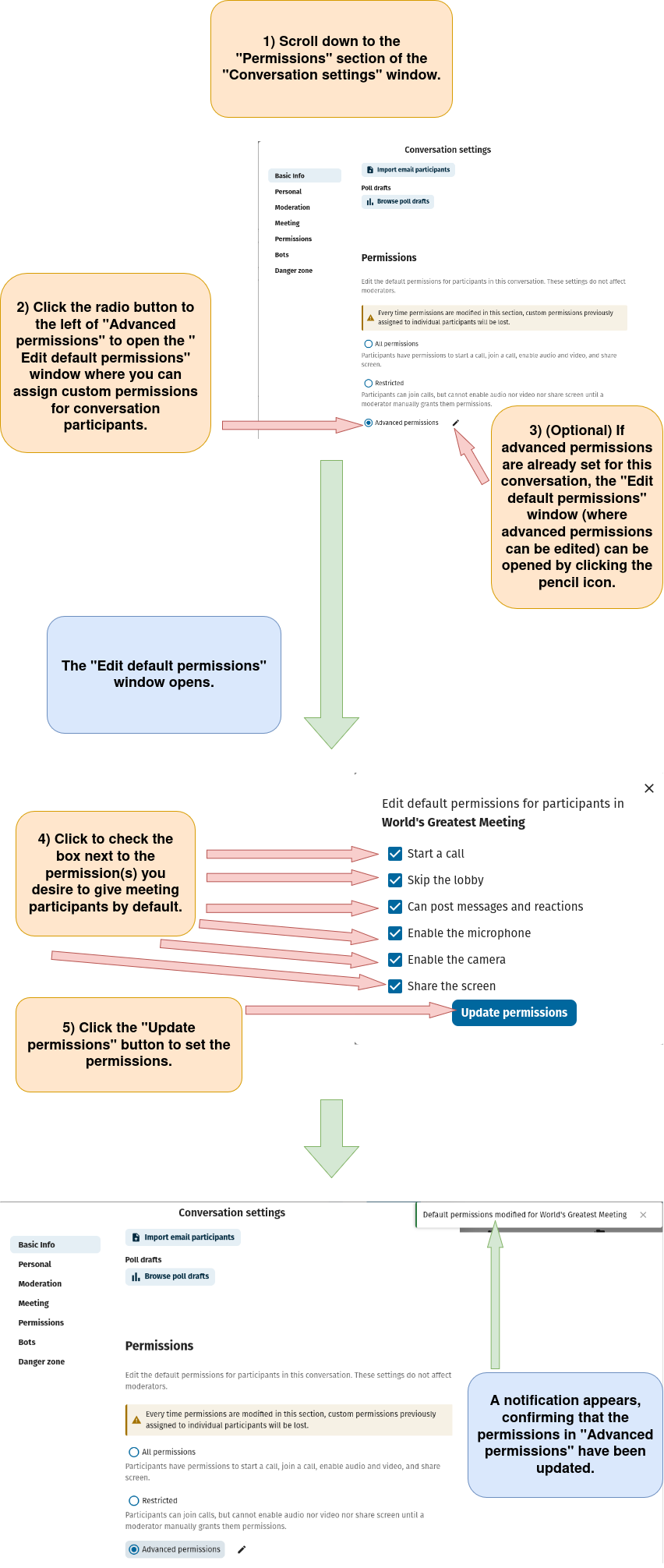
Individually Assign The "Start A Call", "Skip The Lobby", "Can Post Messages And Reactions", "Enable The Microphone," "Enable The Camera", And "Share The Screen" As The Default Permission(s) For Participants In A Nextcloud Talk Conversation
Nextcloud
nextcloud-talk
philip
August 13, 2025, 2:50am
1
Individually Assign The “Start A Call”, “Skip The Lobby”, “Can Post Messages And Reactions”, “Enable The Microphone,” “Enable The Camera”, And “Share The Screen” As The Default Permission(s) For Participants In A Nextcloud Talk Conversation.
1) Log in to Nextcloud.
2) Navigate to Nextcloud Talk as described
here
.
3) Open the “Conversation settings” menu as described
here
.
4) Assign individual “Advanced permissions” as the default permission for participants in a Nextcloud Talk Conversation.
image
852×2011 295 KB