Make A Calendar Visible In Nextcloud Calendar

Make A Hidden Calendar Visible In Nextcloud Calendar

1) Log in to Nextcloud


2) Navigate to Nextcloud Calendar


Navigate to Nextcloud Calendar as described here.


3) Make the desired calendar visible


In Nextcloud calendar’s left sidebar there is a dropdown labelled “Hidden” when there is a calendar that exists but is not visible. Click on the dropdown arrow on the right of the “Hidden” dropdown to open the dropdown to see the hidden calendar(s).
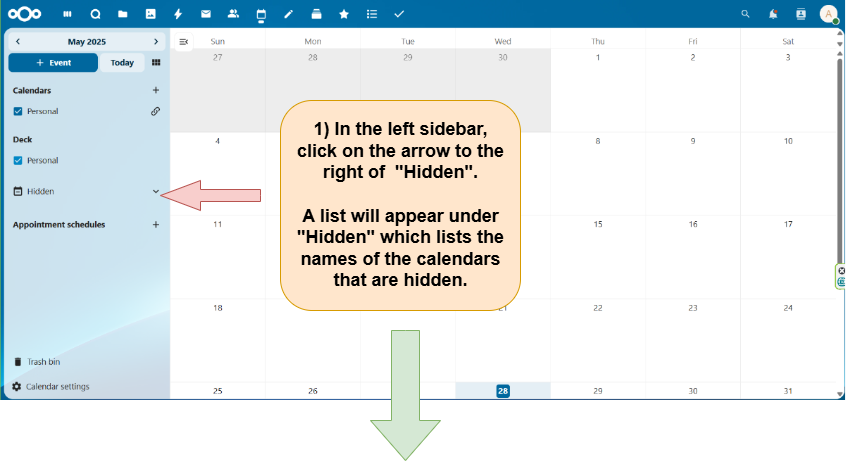
image


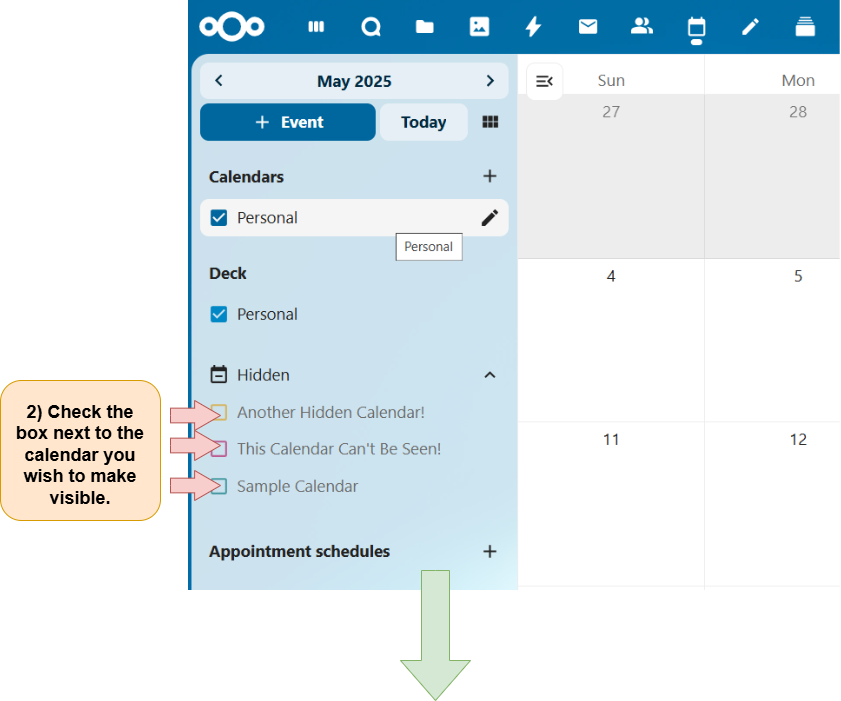
You can now see the calendars that were previously hidden. To make a calendar visible, check the box to the left of the calendar’s name in “Hidden” dropdown in the left sidebar.
image


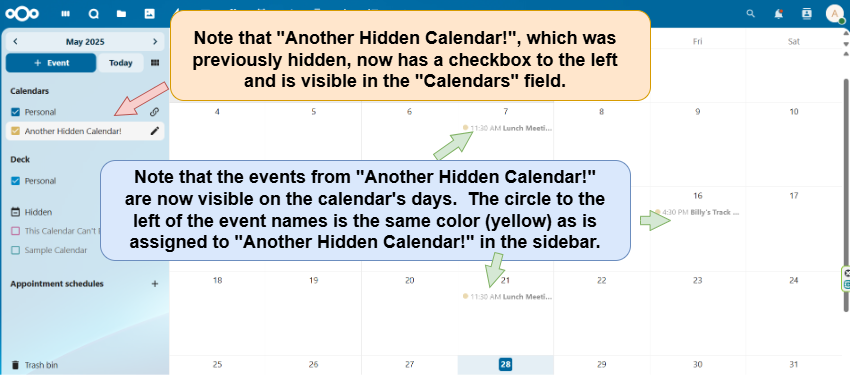
Once you have checked the box next to the name of the calendar you wish to make visible, the name of that calendar will become visible in the left sidebar and the events in that calendar will populate the corresponding days on the calendar’s pages.
image


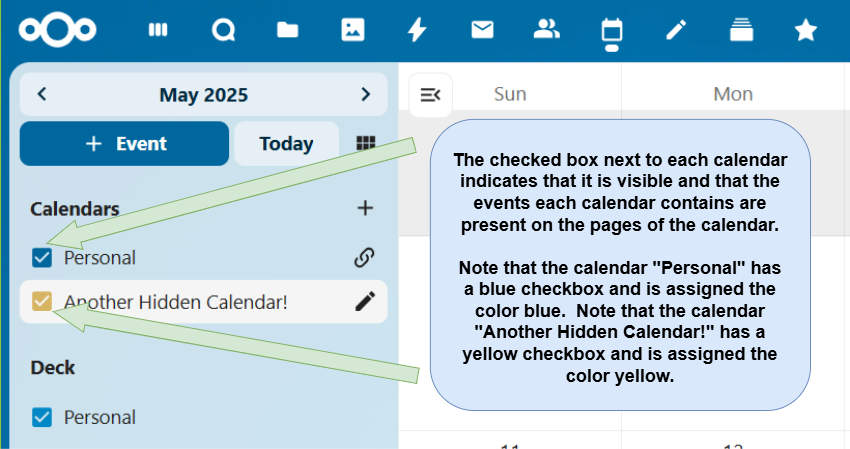
Calendars are indicated as visible in the Nextcloud Calendar left sidebar by having the box to the left of the calendar name checked. The checkbox for each calendar is a particular color, with each particular color being assigned to one specific calendar.
image


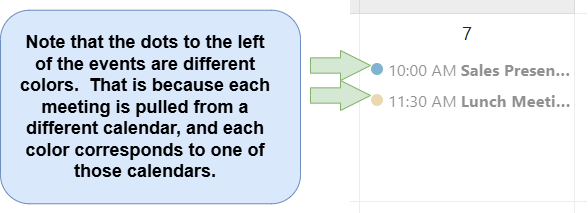
Here is a close-up of what an event looks like on the calendar. The calendar to which the event belongs is indicated by the color of the dot to the left of the event’s name. This color corresponds to the color assigned to the checkbox to the left of the calendar’s name in the left sidebar.
image

Edit An Event In Nextcloud Calendar, Comprehensive Guide
Open The Event Editor In Nextcloud Calendar
Navigate To An Event In Nextcloud Calendar
Open The Advanced Sidebar Editor In Nextcloud Calendar
Assign A Role To An Attendee Invited To An Event In Nextcloud Calendar
Add A Nextcloud Talk Conversation To A Calendar Event
Assign An Event Confirmed, Tentatvive, Or Canceled Status In Nextcloud Calendar
Select Event Availability As "Show Full Event", "Busy", Or "Hide Event"
Assign An Event Busy Or Free Status In Nextcloud Calendar
Edit An Event In Nextcloud Calendar, Comprehensive Guide
Change An Event's Color In Nextcloud Calendar
Assign Interval Between Event Reminders In Nextcloud Calendar
Edit Interval Between Event Reminders In Nextcloud Calendar
Assign A Category To An Event In Nextcloud Calendar
Assign An Event To Receive A Notification Reminder or An Email Reminder
Remove An Event Reminder In Nextcloud Calendar
Set Up Or Edit A Recurring Meeting, How Often The Meeting Recurs, And A Stop Date For The Recurring Meeting In Nextcloud Calendar
Add An Attachment To An Event In Nextcloud Calendar
Remove An Attachment From An Event In Nextcloud Calendar
Open The Event Editor In Nextcloud Calendar
Navigate To An Event In Nextcloud Calendar
Set Up Or Edit A Recurring Meeting, How Often The Meeting Recurs, And A Stop Date For The Recurring Meeting In Nextcloud Calendar
Change An Event's Color In Nextcloud Calendar
Assign An Event A Reminder Type Of "Relative To Event" Or "On Date" In Nextcloud Calendar
Assign An Event A Reminder Type Of 'Relative To Event' Or 'On Date' In Nextcloud Calendar
Find A Time When All Event Attendees Are Free, Schedule An Event When All Attendees Are Free
Add An Attachment To An Event In Nextcloud Calendar
Remove An Attachment From An Event In Nextcloud Calendar
Find A Time When All Event Attendees Are Free, Schedule An Event When All Attendees Are Free In Nextcloud Calendar
Remove An Event Reminder In Nextcloud Calendar
Assign A Category To An Event In Nextcloud Calendar
Assign An Event To Receive A Notification Reminder or An Email Reminder
Set The Length Of Time Betwwen Event Reminders
Set An Event's Status As Confirmed, Tentatvive, Or Canceled In Nextcloud Calendar
Assign An Event Busy Or Free Status In Nextcloud Calendar
Set Event Availability As "Show Full Event", "Busy", Or "Hide Event" In Nextcloud Calendar
Assign A Role To An Attendee Invited To An Event In Nextcloud Calendar
Change The Amount Of Time Between Event Reminders Being Sent
Add A Nextcloud Talk Conversation To A Calendar Event
Open The Advanced Sidebar Editor In Nextcloud Calendar